Choosing a flexible and SEO-friendly WordPress theme is hard, but choosing one that helps you make the most money is even more complex.
The first step to making a great WordPress site is to choose a theme. Still, you need a perfect theme to get free traffic from search engines and make money from your site without making it hard for people to use.
When I ask bloggers new to WordPress what they want in a theme?
They want a theme that makes money, is fast, adaptable, SEO-friendly, and affordable.
It is often impossible to find a theme with all the above characteristics.
New bloggers often ask me, “Why should we buy premium WordPress themes?”
I’ve been using WordPress since 2013 and have tried a lot of free themes. Most of them were either slow or not good for SEO.
So, I introduced you to one of your best-paid WordPress themes for your website. MythemeShop’s Authority Theme from MyThemeShop. Look into GeneratePress.
Note: This MyThemeShop Authority Theme Review was written in 2016, so it’s outdated. All of my blogs and websites are now on either GeneratePress Theme or BricksBuilder.
Authority Theme from MyThemeShop Team
This theme works well with your WordPress blog and helps you quickly build and optimize your brand and reputation.
Why?
The Authority theme is based on Matthew Woodward’s six-figure blog design, and since he backs it, you can trust it to help you build your brand.
Authority Features
Check out some of the MyThemeShop authority theme’s best features.
Mobile-friendly and Easy to Use
If you start with a responsive website, Google will like you more. WordPress has many tools that can help you do this.
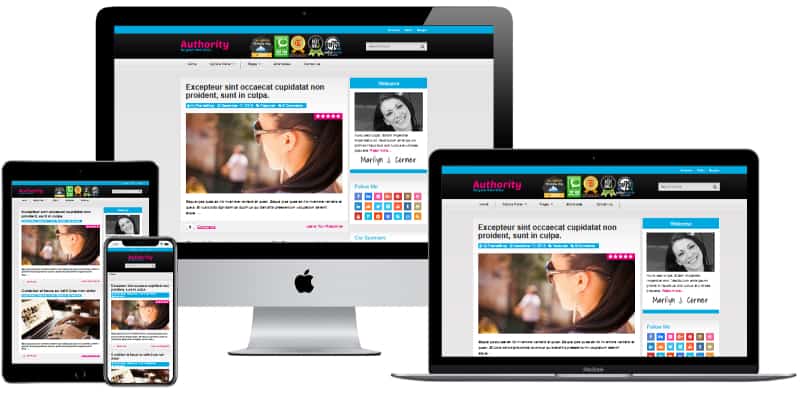
But why would you install plugins to make your website mobile-friendly when this theme makes your blog super-responsive and fits it to any screen?
Look at the picture to see what this theme does for your website.
Why do you need to make your blog mobile-friendly?
To get the most out of SEO for your website, you should check for updates and new rules from Google and apply them to your site. Google says that making your site mobile-friendly will help it rank higher.
Speed
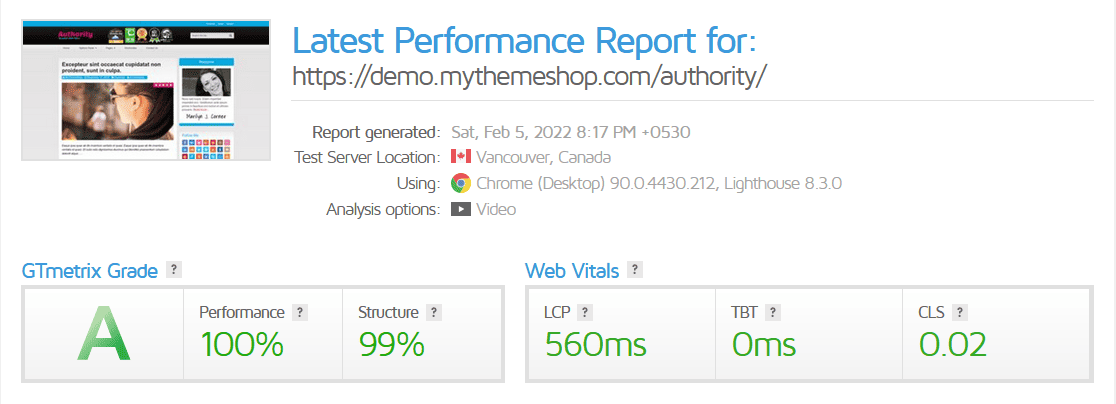
People love fast websites, and no one wants to wait more than three seconds for your site to load. Google decides your SERP based on how fast your site is; you should take that seriously. It also helps to lower your user bounce rate.
The authority theme doesn’t take up much space and only weighs 100 kb (front-end loading). It speeds up how quickly your site loads.
Powerful schema.org integration
You will see star ratings when you look for a product review on a search page. With schema.org markup, you can do that. Schema markup gives you a unique look in search engines and makes it easier for them to understand your website.
You get a strong schema.org foundation from the Authority theme.
Many people think schema.org helps you get a better search engine ranking, but a study done by backlinko on one million domains shows schema markup has nothing to do with higher rankings.
Powerful Option Panel
My biggest fear is coding to change a theme, so I always look for a theme that needs little or no coding.
MTS Authority gives you a powerful optional panel where you can change many small things that other themes can only do with plugins or code.
All these changes must be done through the customizer, a standard by WordPress. I don’t know why MyThemeShop doesn’t add its optional panel to the customizer. Because of this, I only give code four stars.
Top-notch Support Forum
MTS has a forum where you can get help, and you get a response in 2 to 4 hours.
I want to change the date my post was published to when it was last updated. I posted this question in their forum and got a response in 2 hours.
Check out this video for a tutorial on how to set up the MTS authority theme.
Updates
Why would you buy a paid WordPress theme that doesn’t get changed often?
I bought the authority theme on 03/04/16; as of this writing (13/04/16), MyThemeShop shipped two changes. It shows how serious they are about business, so you feel safe giving them your money.
Ads Placement
Every blogger needs revenue; revenue is generated via affiliate marketing or ads e.g., Adsense, but it takes a lot of testing to find the best place for them on your blog.
Matthew Woodward knows where to put ads on his blog to make six figures, and MyThemeShop makes it easy for everyone else to do the same. Go to the Ads Management tab in the Theme Options box and place your ads in the best place possible.
Website Layouts
This theme comes with four beautiful website and homepage layouts that can be used with it. Check out and try out each variation to see which one works best for your website.
Fewer Plugins
MyThemeShop already has many features built-in, so you don’t need the plugin to do those things.
For example,
- A social media sharing Button built into the theme
- Related Post
- Author Box
- Author comments highlight
- Breadcrumb
- Perfect Ads Placements
☑️: For more information on the WP speed optimization procedure, see how to speed up your WordPress site.
Summary
Pick a good theme for your blog and stick with it for a long time. Even though you can change your blog’s look often, building a solid base is essential.
I use MTS products and themes on many websites and would suggest them to anyone.
Note: This authority WordPress theme review was written in 2016, so it’s outdated. All of my blogs and websites are now using BricksBuilder or GeneratePress Theme.
