Admit it; you are searching for high-quality WordPress hosting for your WP projects.
Which provides an easy-to-use hosting control panel, excellent features, and affordable pricing.
But you may need clarification about which hosting plan or features best suit your needs.
Still, confused?
Don’t worry. I am here to help you find an affordable and optimized web host for your WordPress website and decide which plan or features would be best for you.
In this article, you will find,
- WordPress hosting minimum requirements.
- Types of WordPress Hosting.
- Things to consider while buying WordPress hosting packages for your business or projects.
What are the Minimum Requirements for Hosting a WordPress Site?
WordPress is lightweight and easy to run on any web server worldwide. Which have PHP and MySQL(replace MySQL with your favorite database name) installed.
The simple need is,
- PHP version 7.4 or greater.
- MySQL version 5.7 or greater OR MariaDB version 10.3 or greater.
- HTTPS support
- Apache: mod_rewrite module (for clean URIs a.k.a. Permalinks) (Required for Multisite)
But for PHP, always choose a host that provides version 7.4 or higher for your installation.
As we all know, WordPress is the world’s leading software for creating websites for various projects. Your hosting provider may provide several scripts and tools to install and customize your WordPress installation.
I prefer Nginx or LiteSpeed over Apache, but any option will work fine if your caching setup is properly configured.
How many WordPress hosting plans are present, and which is suitable for me?
Due to its mammoth share in the online world (43.3% of websites use WordPress). You can find many companies that provide different plans for hosting with them.
And it isn’t very clear, especially for first-time users.
In the below post, I’ll explain four types of WordPress hosting with pros and cons. I will also guide you on which plan suits your next projects.
Free Hosting

Confession time — sometimes(a lot of the time), I get distracted by the word “free“. It reminds me of my childhood shopping experiences when my parents never let me have anything for free unless it was part of an event’s goodie bag.
In the online world, there is much free content to explore! Yet, it’s no secret that most of these “free” items come with a catch – whether clicking on an ad or sharing the content with someone else.
Many free hosting providers in the market offer free hosting for WordPress, but with a catch.
What? What is the catch?
These offers are generally found on Google’s organic listings, small groups, or forums. And these companies or individuals provide you with limited free hosting space in exchange for a link or the display of their ads on your site.
And honestly, it’s understandable! After all, there’s no such thing as a free lunch.
But sooner or later, you will find,
- Frequent downtime. (You never find a real reason for those downtimes)
- Increasing load time means fewer visitors and a lower ranking in search engines’ eyes.
- Redirect your traffic to free hosting provider ads partners. (Personal experience.)
- Malicious code injection (I experienced it.)
- Loads of Ads on your site(and none of them is reliable. Many ads are NSFW)
- No Support at all.
- No security at the host level.
- Deletion of your website without giving you a proper warning or notice.
- Website hacked. (Many times and no one can help you in that situation.)
I used free hosting in 2012 when I launched my first WordPress website. After two months, while checking my website in incognito mode, I found that all my traffic was redirected to some Chinese spam sites.
I understand that buying hosting in India can be pricey for new bloggers, but in the long run, it is profitable.
Advice: Avoid free hosting at any cost.
Suitable for: No one.
Suppose you want to avoid the traps of free blogging platforms, free email, or free web hosting and eliminate the possibility of spam on your accounts. In that case, I highly recommend investing in high-quality hosting services and products.
Shared WordPress Hosting:

Shared hosting is the most popular type of WordPress hosting. It’s a popular choice among beginner bloggers and small business owners.
How shared WordPress hosting work?
When you use shared hosting for your next WordPress site, you and hundreds of other users share and utilize the same server resources.
So, why are shared WordPress hosting plans popular among newbies?
- Low Cost: Cost is a major obstacle for newbie bloggers and small business owners. Shared hosting allows them to share server space with numerous other users, which helps keep the costs down.
- Easy to Setup: Many novice bloggers and small business owners may need to be more technically skilled. In such cases, shared hosting offers 1-click install scripts to simplify the installation process.
Shared hosting is good because of its low-cost plans. If you are a beginner in WordPress, starting a new WP project, or even planning to start a hobby blog, it can help you save significant money.
You still get all the features of higher plans, such as 99.99% uptime, WP-CLI support, and 24×7 DDoS protection, even with a low-cost shared hosting plan.
Note: Choosing a shared WordPress hosting provider is recommended if you are in the starting phase. You can always migrate to a higher plan or another host if the current plan becomes insufficient.
Suitable for: New bloggers, Small websites, and Small businesses.
Best Suggestion: MyW, A2 Hosting.
WordPress VPS Hosting

What if your website outgrows the shared hosting environment? What if your website suddenly goes viral on Reddit, or your article gets shared by industry influencers, but you’re still using shared hosting?
You will receive an email from your hosting company to upgrade your plan, or they may suspend your account due to high traffic.
But, you may not want to spend a fortune on dedicated servers as the surge in traffic is temporary, and everything will return to normal in a day or two.
Virtual Private Server (VPS) hosting is better than shared hosting for these situations.
How does WordPress VPS hosting work?
With Virtual Private Server (VPS) hosting, you still share hardware with other users, but you get a little dedicated space for yourself. This provides you with almost as much control as a dedicated server and a dedicated IP (which is great for SEO). You can install any operating system and your preferred software on it.
VPS is generally described in two types,
- Managed VPS: In this type of hosting, the hosting provider takes responsibility for everything, including updating software, securing the system, and so on.
- Unmanaged VPS: You are responsible for everything in this type, from installing software to fine-tuning your server.
Managing a VPS is great for me using Webinoly. Webinoly allows me to install a battle-tested WordPress installation with just one line of code. Everything is done through the command line.
If you cannot set up your VPS on your own, consider choosing a managed VPS hosting service.
Note: Unmanaged VPS hosting for WordPress is less expensive than managed VPS hosting for WP.
Unmanaged VPS Suitable for: Technical Bloggers, High traffic websites and blogs, Medium-sized businesses, and Developers.
Managed VPS Suitable for: Technical Bloggers, Non-technical Bloggers, High traffic websites and blogs, Medium-sized businesses, Developers, and Designers.
Unmanaged VPS Providers: Vultr, DigitalOcean.
Managed VPS Provider: A2 Hosting.
☑️: With Webinoly, you can launch a WordPress-optimized VPS in seconds.
Dedicated Servers for WordPress:

If you don’t want to share resources with others, you can buy a dedicated server from your hosting company.
How do WP Dedicated servers works?
You purchase a physical server through your hosting company and will be solely responsible. This will give you complete control over the server’s hardware and software.
Like VPS hosting, dedicated servers have two types,
- Unmanaged Dedicated Server: If you have knowledge of servers and know how to install and manage them, you can buy a dedicated server. Otherwise, buy a Managed Dedicated Server or hire a system admin to handle your server operations.
- Managed Dedicated Server: If you lack technical knowledge but still want a dedicated server for your business, you should go for it.
Note: Unmanaged and Managed Dedicated Servers are suitable for high-traffic sites.
Dedicated Server Provider: A2 Dedicated Servers.
Managed WordPress Hosting

The hosting types mentioned above are general in the industry. However, due to the massive demand and heavy usage of WordPress, hosting companies now provide Managed WP Hosting solutions.
In this type of hosting, you are not responsible for anything. The hosting provider handles everything, optimizing your website for performance and speed, taking backups, and keeping your WordPress installation up-to-date.
They will guide you in choosing the right themes and plugins for your website.
In this type of hosting, you are limited to installing only WordPress, which is good.
A Managed WP hosting provider offers superior performance and top-notch support. Their support staff has extensive experience with WordPress, which helps you avoid any issues with the hosting or WP features.
Note: Managed WP hosting is costlier than Shared and VPS hosting.
Managed WordPress Hosting’s Suitable for: Established Blogger, High Traffic Sites.
Best Managed WP Hosting Providers: Rocket.Net, Kinsta, WPEngine.
Things to consider before buying WordPress hosting for your business or projects.
We want top-notch WP hosting for blogs or businesses, right?
But how can we differentiate between companies that are top-notch and those that are not?
So, Here are some criteria and checklists to consider before buying your next hosting.
You can test your web hosting using the checklist below and share your experience or score with me regarding your hosting provider.
Note: There are four major hosting types for WordPress. Some of the checks may not apply to your current hosting type.
Better Uptime Rate

24×7 availability is a crucial requirement for every business worldwide, and it also applies in the online world.
Imagine someone refers potential customers to your website, but unfortunately, your site is down.
I know: ☹️ It’s not your fault, but what happens in this scenario?
You will lose a potential customer.
What if your website frequently goes offline without any explanation?
You will lose numerous potential customers and still be charged for those offline hours or days, right?
Always check your potential web host’s uptime guarantees and promises to avoid these disasters. And never settle for anything below a 99.99% guarantee on any hosting plan.
For uptime promises, Instead of just believing in the written words on the web host’s site, it is important to check the online uptime reviews for that web host.
The earlier lines provide useful information for making decisions before purchasing hosting. However, what can you do if you already have a website or want to monitor the uptime of your current hosting?
There are many great services present for website uptime monitoring, like,
Note: Don’t settle for anything below 99.99%, even if you’re considering purchasing affordable shared hosting.
Better Software Support

When choosing a web host or shortlisting potential hosting partners for your next WordPress project, consider the following: look for hosting partners that regularly update their server stacks.
As we know, WordPress supports PHP version 7.4, but the PHP team has since released versions 8.1 and 8.2, which are significantly faster than 7.4.
Check this infographic by Kinsta,
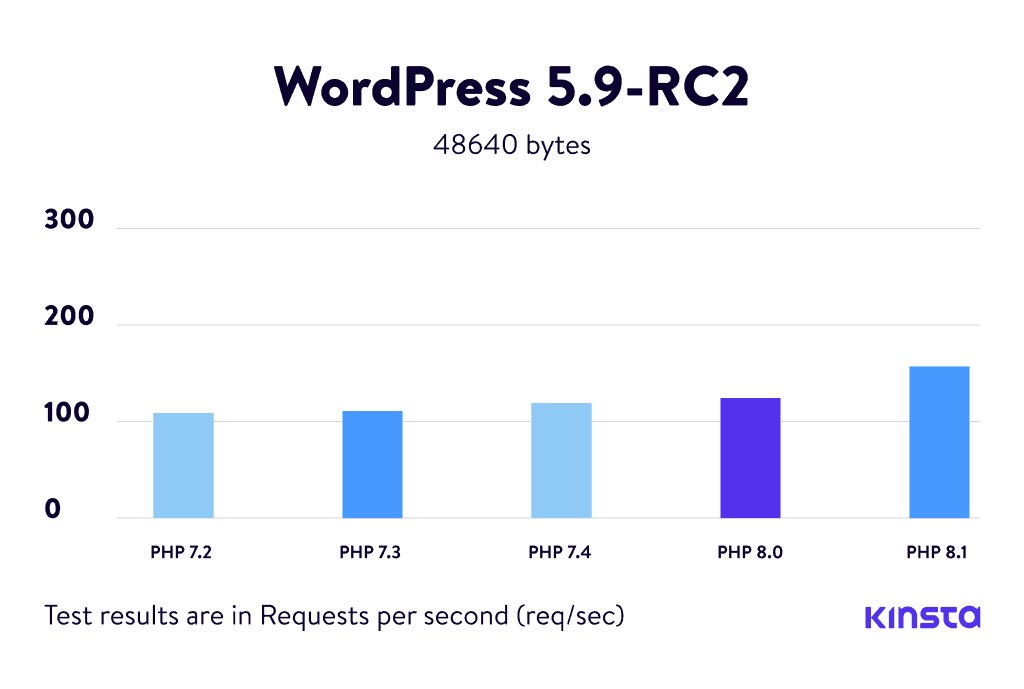
Updating your softwares to the latest version can help prevent hacking attempts on your server and make your WordPress site more secure at the server level.
It also results in faster loading times for your WordPress website. How?
Every new update includes bug fixes and improved code over the earlier release, which helps reduce the time it takes to load the website and decrease the Time To First Byte (TTFB) at the server level.
Note: Using the latest software and hardware for your website can make it load faster and helps to avoid common security problems.
Host Level Caching

WordPress offers various caching plugins, and we have listed some of the best free plugins for speed optimization here.
WP Rocket, Swift Performance, and Cache Enabler are my personal favorites.
But these plugins cannot match the caching performance of host-level caching solutions
Why?
When someone connects to your site, their browser first connects to the hosting server. The hosting server executes commands related to users’ needs and provides them with what they want.
In Only Plugin Solution: The server connects to the WordPress database, and then the caching plugin appears.
In Host Level Caching Solution: The server gives the required output to the user without requesting WordPress.
Note: Server-level caching lets you to focus on your WordPress site without worrying about optimizing it for high traffic. Choose Rocket.Net or Kinsta.
You can also optimize your WordPress installation and serve cached pages at the server level using Webinoly or CloudPanel with any leading SSD VPS provider.
WordPress Specific Features

We are talking about a specialized WordPress hosting provider. How can we forget features which are specific to WordPress itself?
What are the WordPress-specific features?
- 1-Click easy installation or pre-installed WordPress setup.
- Automated updates to the latest WordPress version.
- WP-CLI and SSH Access for command-line access to your WP host site.
- Optimized HTTP & MySQL for faster performance.
- Server-level caching for blazing-fast speed.
- Daily WordPress site backups to make sure data safety.
- Real-Time Security Scanning for Vulnerabilities in WordPress themes or WP Plugins.
- Free account migration from one host to another host.
SSL Support
I am an SEO guy, and I often search Google for tips on improving my website’s search engine ranking quickly and efficiently.
Suppose you search on Google for a specific query. Sometimes you may notice two websites with the same information. However, a site with HTTPS may rank higher than a plain HTTP site.
Why? Because Google recommends using SSL on your websites.
How does SSL help WP Sites?
First, it helps to rank better in search engines.
Secondly, if your web host supports PHP version 7.4 or higher and you can install an SSL certificate, your website will load faster than before due to HTTP/2 technology.
Note: HTTP/2 only support website with SSL certificates.
SSL also helps you to gain user trust, especially if you want to sell on your eCommerce site.
If you don’t have enough money, consider a hosting service with Let’s Encrypt enabled, or use the free Cloudflare Flexible SSL.
Summary
Now, you have a clear idea about your next search for a suitable WordPress hosting provider. Always remember that nothing in the hosting world is truly free or unlimited.
Choose your host wisely.
If you still have any doubts, please ask me in the comments. If you found this post helpful, please share it with your friends.

Zezari
Add the site UptimeControl(.)net to the article, because only they have a 3-minute site availability check interval on the free plan.
masoodalam51
HetrixTools has a one-minute site availability check from four different locations on the free plan.
Nathaniel
Managed WordPress hosting is the best. since the provider takes care of everything, the site owner can worry about running the business rather than worrying about hosting.
masoodalam51
That’s true, but nowadays, many hosting providers are looting customers in the name of Managed WordPress Hosting.