Are you a WordPress site owner wanting to increase your website speed as quickly as possible?
Right?
When you ask any WordPress developer or user how to speed up the site, They recommend installing an excellent caching plugin.
WordPress has almost 60,271 plugins, so finding a robust caching plugin is still a small deal.
But, Finding an excellent WordPress cache plugin for your website is a difficult task. When I searched for a WordPress caching plugin on Google, it generated 32,20,000 results.
So, how can I find a caching plugin that is both user-friendly and powerful?
This post will assist you in finding a caching plugin for your WordPress installation that is both powerful and user-friendly.
Why did we try to speed up WordPress?

First, I’m not too fond of the website when it’s not open for 3 to 4 seconds. I think you should too.
We live in a Google-dominated digital world, and Google considers site speed a ranking factor in organic listening.
So:
Take website speed seriously and explore new ways to improve the performance of your WordPress installation.
Note: WordPress is a great platform and dominates the web world with a 43% market share. Still, we have some room for improvement. [It’s my personal opinion]
✅: Take a look at our list of the top free plugins for making WordPress faster, as well as our guide on choosing the best WordPress hosting to save money.
Demo WordPress Setup and Cache Plugins Performance Test
I use MyW direct admin shared hosting with PHP 8.0.13, Maria DB 10.4.21, and Divi theme with Digital Marketing home page demo installation for this post. All plugin tests are repeated 4 to 5 times for a median score.
Why MyW?
I have a lifetime reseller hosting package with 25 GB of storage. They offer LiteSpeed Enterprise hosting with excellent performance and uptime. Currently, I am using MyW to host BLOGGYAANI.
I am using the Digital Marketing home page demo of the Divi theme forpurposes. Please note that I have not enabled any minification settings and have maintained the same website setup for each plugin test.
For performance checking, I use GTmetrix [Vancouver, Canada Location].
Note: I am trying to find the most user-friendly and effective caching plugin. If you have any suggestions or comments, please feel free to share them in the comments section.
Default WordPress speed without caching plugins enabled
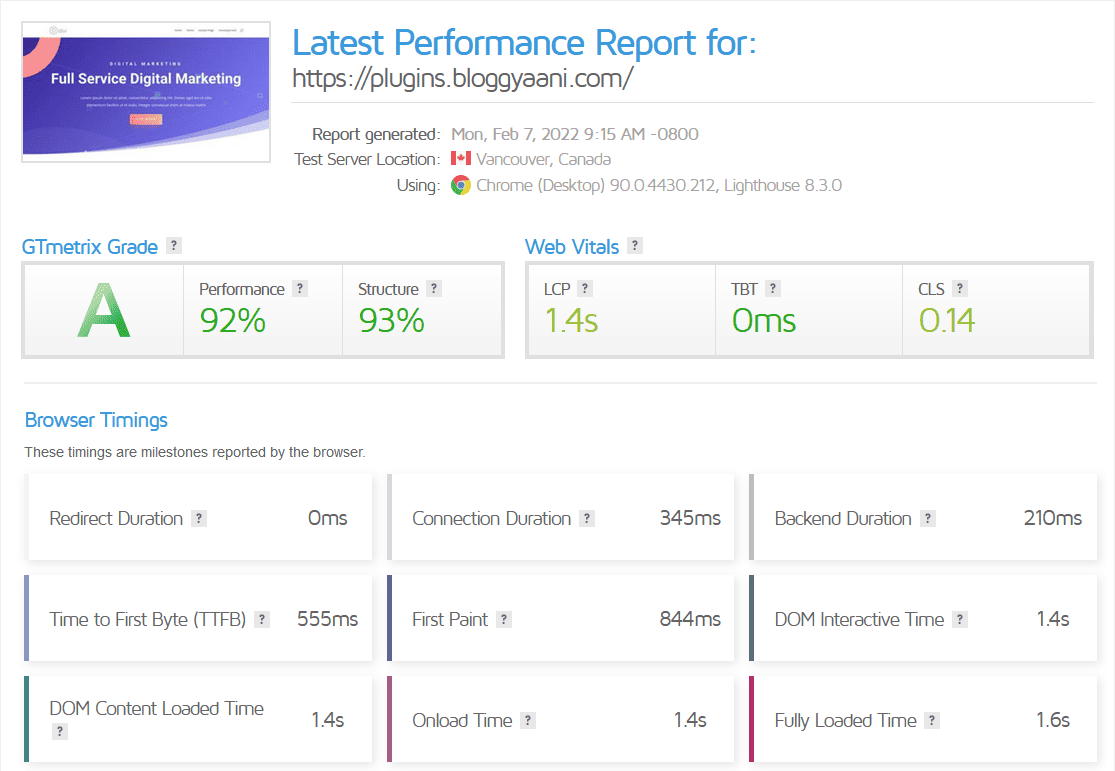
Default Divi WordPress installation without any caching enabled. With 26 requests, 834 KB (compressed), 1.34 MB (uncompressed), and 10 unoptimized images.
| GT Grade | A |
| Performance | 92% |
| Structure | 93% |
| LCP | 1.4s |
| TBT | 0ms |
| CLS | 0.14 |
| Page Size | 834 KB |
Cache Enabler

KeyCDN developed and maintained Cache Enabler, a user-friendly plugin for creating static HTML pages and storing them on the web server disk space.
When a user visits your website, instead of directly accessing the backend server, static HTML pages stored on the hard disk drive can be served by your server. This leads to lightning-fast server responses, enhancing your WordPress website’s performance.
This plugin comes with a simple set of options. Upon activation, you can check some boxes, making your website faster than before.
Features:
- A fast and efficient cache engine
- Automatic smart cache clearing
- Manual cache clearing
- WP-CLI cache clearing
- Cache expiry
- WebP support (convert images to WebP with image optimizing plugins)
- Mobile support
- Brotli and Gzip pre-compression support
- Minification of HTML excluding or including inline CSS and JavaScript
- Real-time cache size display in the WordPress dashboard
- Custom post-type support
- 304 Not Modified support
- Works perfectly with Autoptimize and the majority of other third-party plugins
✅: Look at how the Cache Enabler plugin can significantly speed up your WordPress website.
Cache Enabler Setup:
Setting up Cache Enabler is super lightweight and comfortable. Also, check the Cache Enabler support article from KeyCDN for better performance setup and troubleshooting.
Check the below image for my caching setup.

I disabled the cache minification setting for a fair result.
One of the best features of the Cache Enabler is to show the actual cache size on your dashboard. It also shows a clear cache button in the WordPress admin toolbar.

Cache Enabler Performance Test:
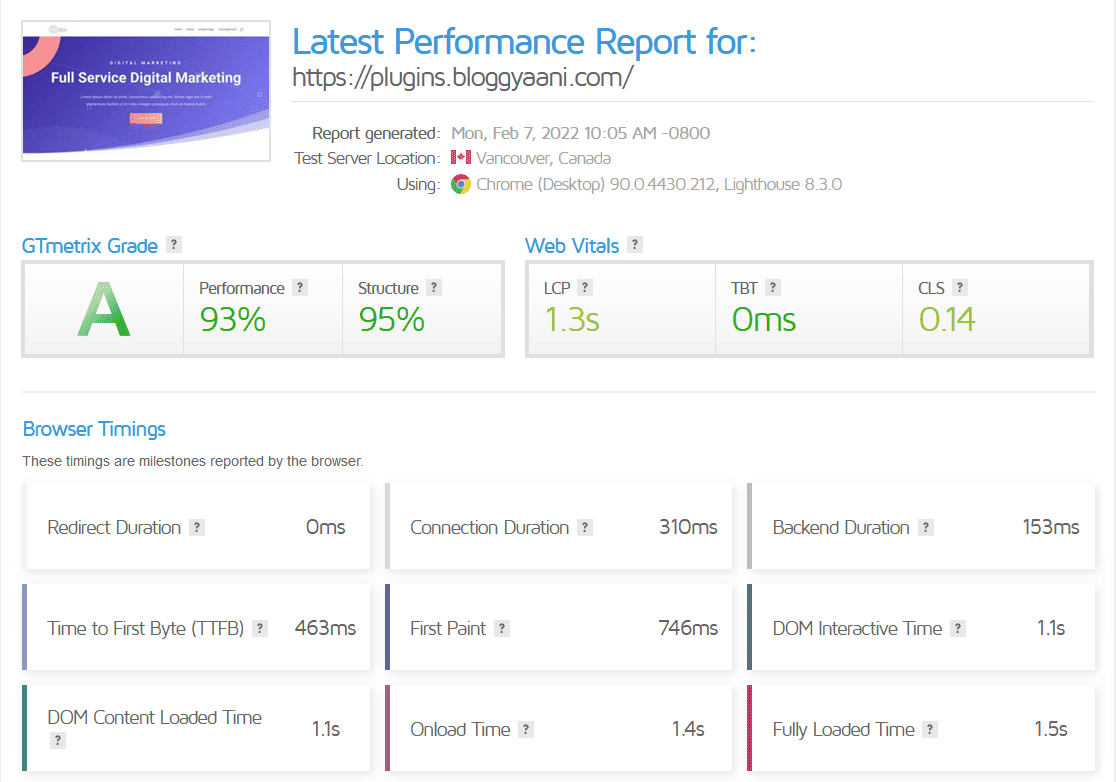
Divi WordPress installation with Cache Enabler. With 27 requests, 861 KB (compressed), 1.38 MB(uncompressed), and 10 unoptimized images.
GT Grade A Performance 93% Structure 95% LCP 1.3s TBT 0ms CLS 0.14 Page Size 861 KB
WP Super Cache

WP Super Cache is the most widely used plugin on this list, maintained by Automattic Inc., the parent company of WordPress. It is currently active on over 2 million websites.
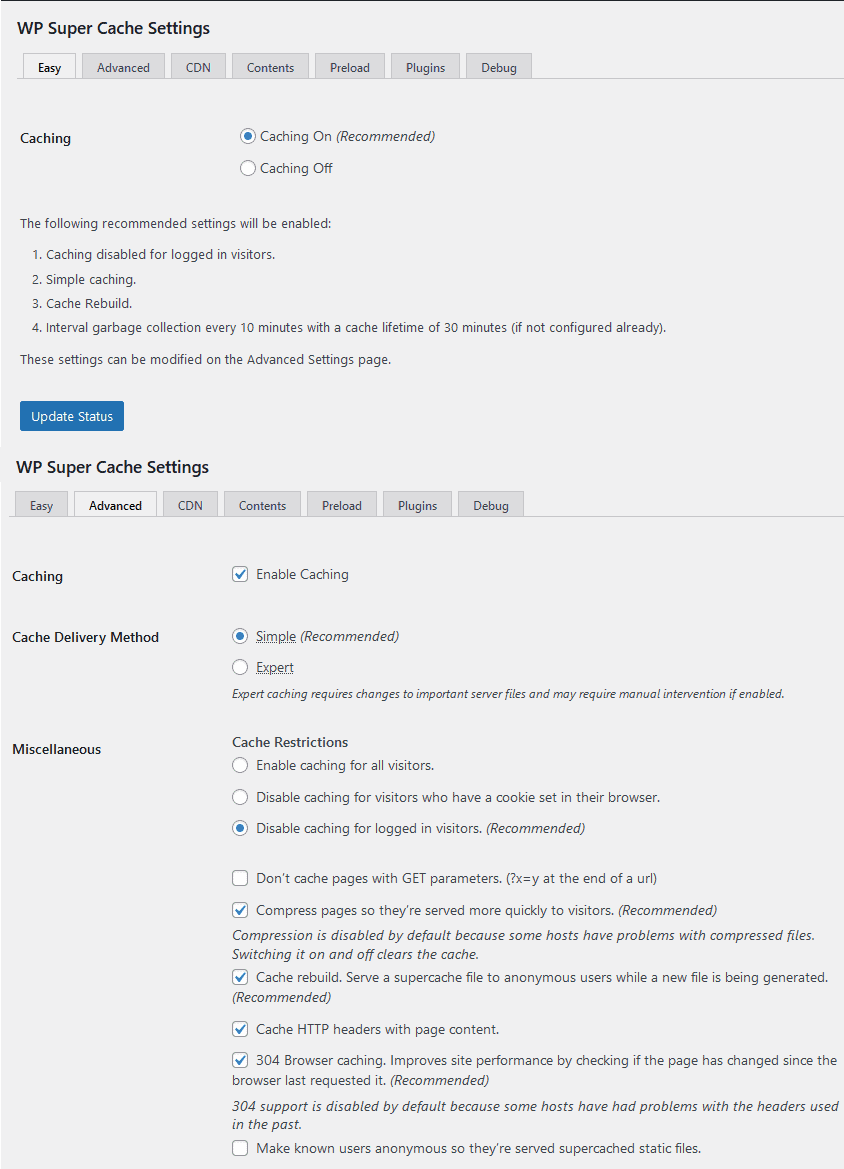
WP Super Cache is a user-friendly plugin, and I prefer to use it in easy mode with only caching turned on (recommended). This plugin creates an HTML version of your WordPress installation and serves it to visitors instead of directly contacting your backend.
I remember when I started using WordPress, and Google suggested WP Super Cache and W3 Total Cache. I chose WP Super Cache because it was easy to install and configure.
Features:
- Support for multiple caching types (Mod_Rewrite, PHP, and Legacy)
- Expert.
- Simple.
- WP-Cache caching.
- Serve static HTML files
- Cache preload
- CDN support
WP Super Cache Setup:
WP Super Cache has many tabs on the setting page, and I only use simple, easy settings.
WP Super Cache Performance Test:
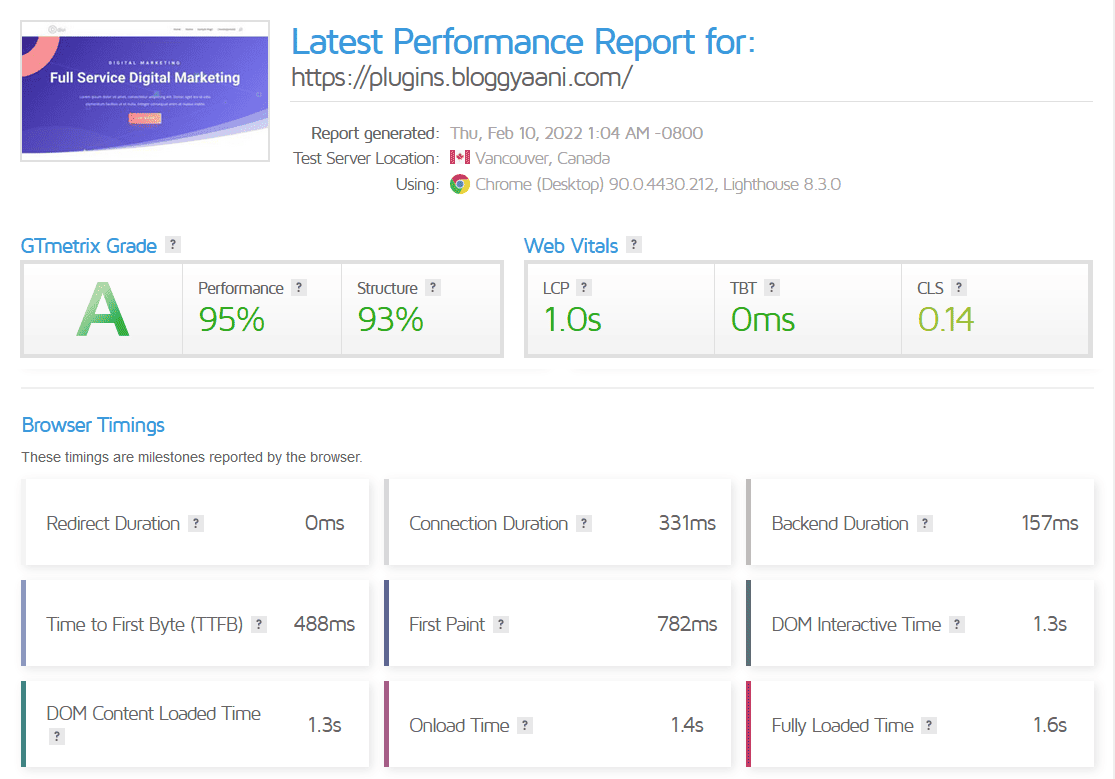
Divi WordPress installation with WP Super Cache. With 27 requests, 834 KB (compressed), 1.34 MB(uncompressed), and 10 unoptimized images.
| GT Grade | A |
| Performance | 95% |
| Structure | 93% |
| LCP | 1.0s |
| TBT | 0ms |
| CLS | 0.14 |
| Page Size | 834 KB |
WP Fastest Cache

WP Fastest Cache is a popular cache plugin with a simple interface. This plugin makes static HTML pages, built-in CSS and JS Minifier, and a compressor.
I am not using the minified or compressing option for fair results.
I am using the free version available in the WordPress plugin directory, which provides essential features and is sufficient for our testing needs. You can find the premium version here for additional features.
Features:
- Mod_Rewrite, which is the fastest method, is used in this plugin
- All cache files are deleted when a post or page is published
- Admin can delete all cached files from the options page
- Admin can delete minified CSS and js files from the options page
- Block cache for specific page or post with Short Code
- Cache Timeout – All cached files are deleted at the determined time
- Cache Timeout for specific pages
- Enable/Disable the cache option for mobile devices
- Enable/Disable the cache option for logged-in users
- SSL support
- CDN support
- Cloudflare support
- Preload Cache – Create the cache of all the sites automatically
- Exclude pages and user-agents
- WP-CLI cache clearing
WP Fastest Cache Setup:
It is a simple configuration; click the WP Fastest Cache plugin option. Check my configuration below pic.
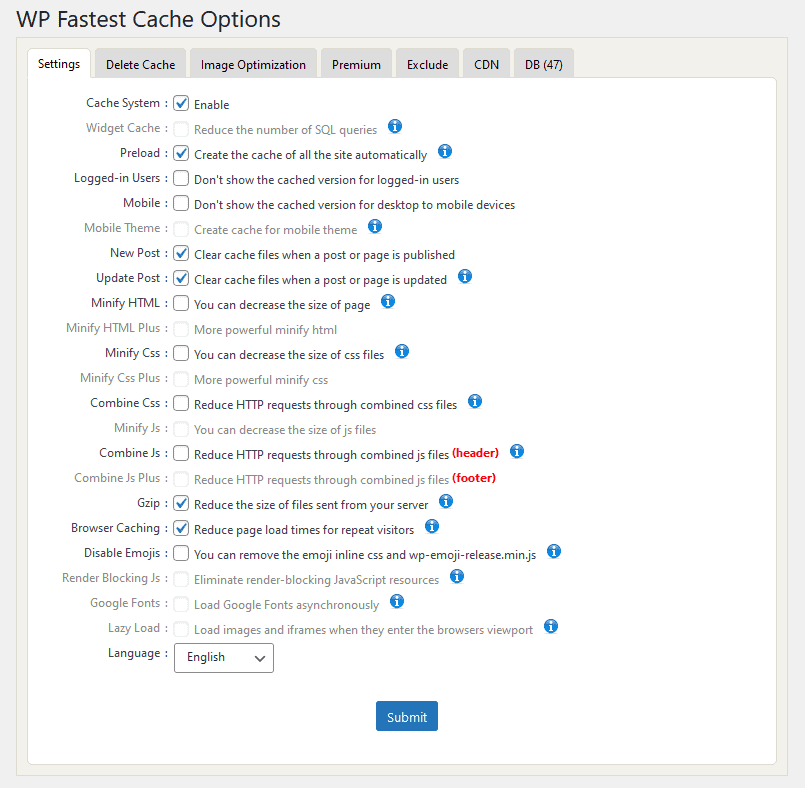
I have not enabled any minifying or combining option for testing purposes, but it is advised to do so to achieve the desired website speed.
WP Fastest Cache Performance Test:
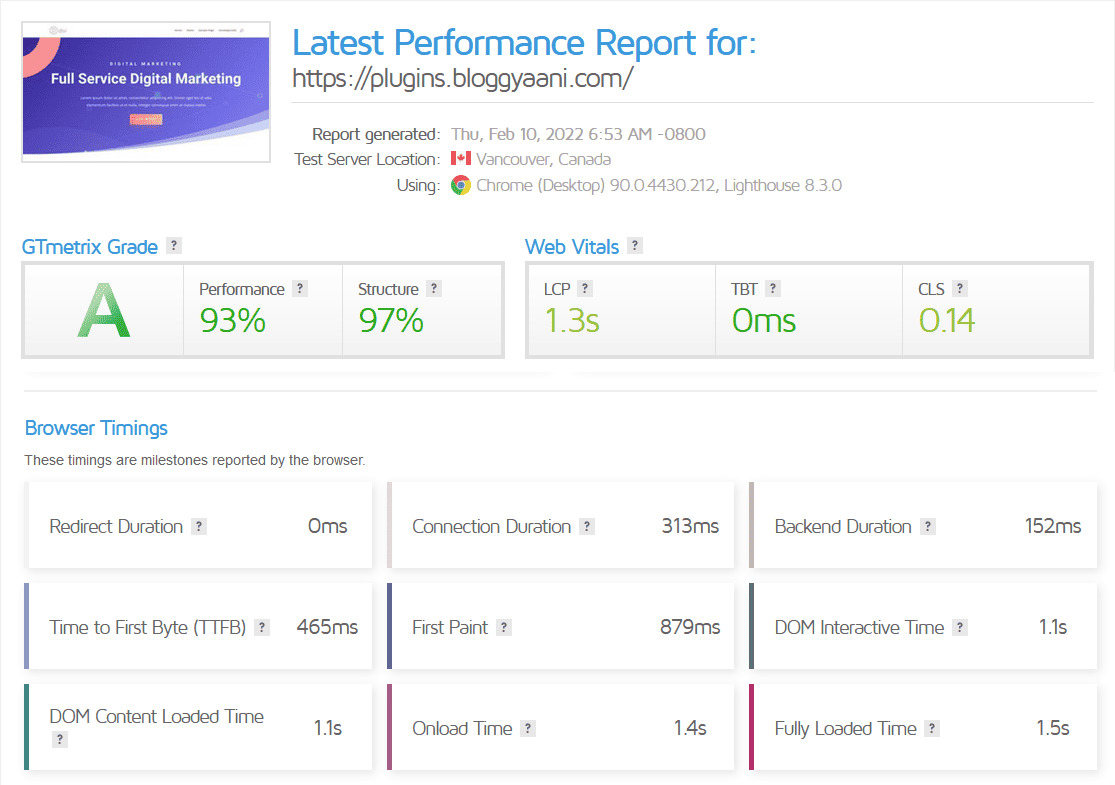
Divi WordPress installation with WP Fastest Cache(Free). With 25 requests, 860 KB (compressed), 1.32 MB(uncompressed), and 10 unoptimized images.
| GT Grade | A |
| Performance | 93% |
| Structure | 97% |
| LCP | 1.3s |
| TBT | 0ms |
| CLS | 0.14 |
| Page Size | 860 KB |
LiteSpeed Cache

LiteSpeed Cache for WordPress (LSCWP) offers an all-in-one site acceleration module featuring a built-in server-level cache and various optimization features.
LSCWP supports WordPress Multisite and can work with the most famous plugins, such as WooCommerce, bbPress, and Yoast SEO.
LiteSpeed Cache for WordPress has also supported ClassicPress sites.
Features:
General:
- Free QUIC.cloud CDN Cache
- Object Cache (Memcached/LSMCD/Redis) Support+
- Image Optimization (Lossless/Lossy)
- Minify CSS, JavaScript, and HTML
- Minify inline & external CSS/JS
- Combine CSS/JS
- Automatically generate Critical CSS
- Lazy-load images/iframes
- Responsive Image Placeholders
- Multiple CDN Support+
- Load CSS Asynchronously
- Defer/delay JS loading
- Browser Cache Support+
- Database Cleaner and Optimizer
- PageSpeed score (including Core Web Vitals) optimization
- Opcode Cache Support+
- HTTP/2 Push for CSS/JS (on web servers that support it)
- DNS Prefetch
- Cloudflare API
- Single Site and Multisite (Network) support
- Import/Export settings
- Attractive, easy-to-understand interface
- WebP image format support
- Heartbeat Control
+ This service is not provided by the LSCache plugin nor guaranteed to be installed by your service provider. However, the service is compatible if you use the plugin on your website.
LiteSpeed Exclusive Features:
- Automatic page caching to improve site performance greatly
- Automatic purge of related pages based on certain events
- Private cache for logged-in users
- Caching of WordPress REST API calls
- Separate caching of desktop and mobile views
- Ability to schedule purge for specified URLs
- WooCommerce and bbPress support
- WordPress CLI commands
- API system for easy cache integration
- Exclude from the cache by URI, Category, Tag, Cookie, User-Agent
- Smart preload crawler with support for SEO-friendly sitemap
- Multiple crawlers for cache varies
- HTTP/2 support
- HTTP/3 & QUIC support
- ESI (Edge Side Includes) support*
- Widgets and Shortcodes as ESI blocks* (requires Classic Widgets plugin for WP 5.8+)
*Feature not available in OpenLiteSpeed
LiteSpeed Cache Setup:
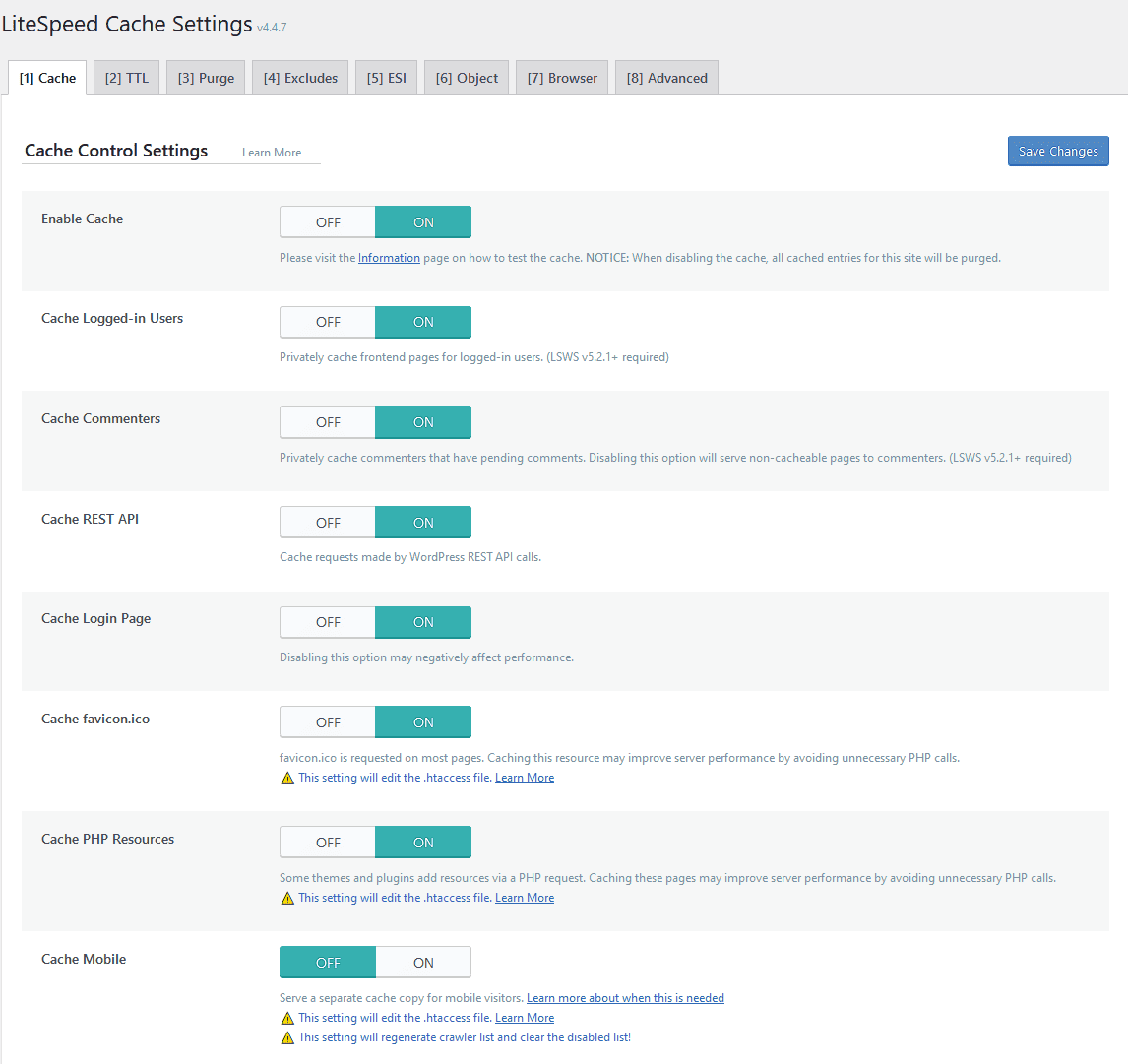
I activated the plugin in default setting mode for this test.
LiteSpeed Cache Performance Test:
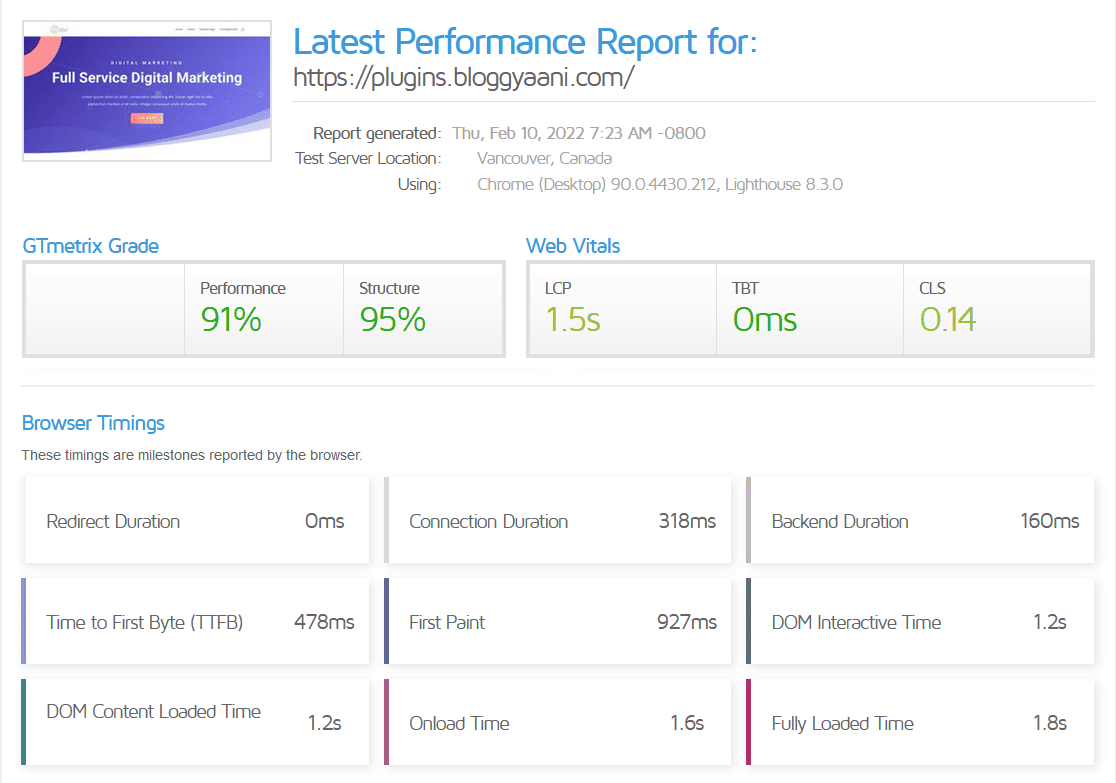
Divi WordPress installation with LiteSpeed Cache(Default Setting Mode). With 26 requests, 840 KB (compressed), 1.36 MB(uncompressed), and 10 unoptimized images.
| GT Grade | A |
| Performance | 91% |
| Structure | 95% |
| LCP | 1.5s |
| TBT | 0ms |
| CLS | 0.14 |
| Page Size | 840 KB |
I’m unsure why GTMetrix doesn’t display a grade for the LiteSpeed Cache. Still, I believe it should receive an A grade. As for the speed metric, default settings won’t provide optimum performance, even using the LiteSpeed Enterprise Server. It’s important to adjust the settings to achieve better results.
Swift Performance Lite

Swift Performance helps your site load more quickly with an intelligent caching system. It can also cache AJAX requests and dynamic web pages, and you can add exceptions (URL, page, or content-based rules).
Features:
- Caching
- CSS and Javascript optimization
- Database Optimization
- Plugin Organizer
Swift Performance Lite Setup:
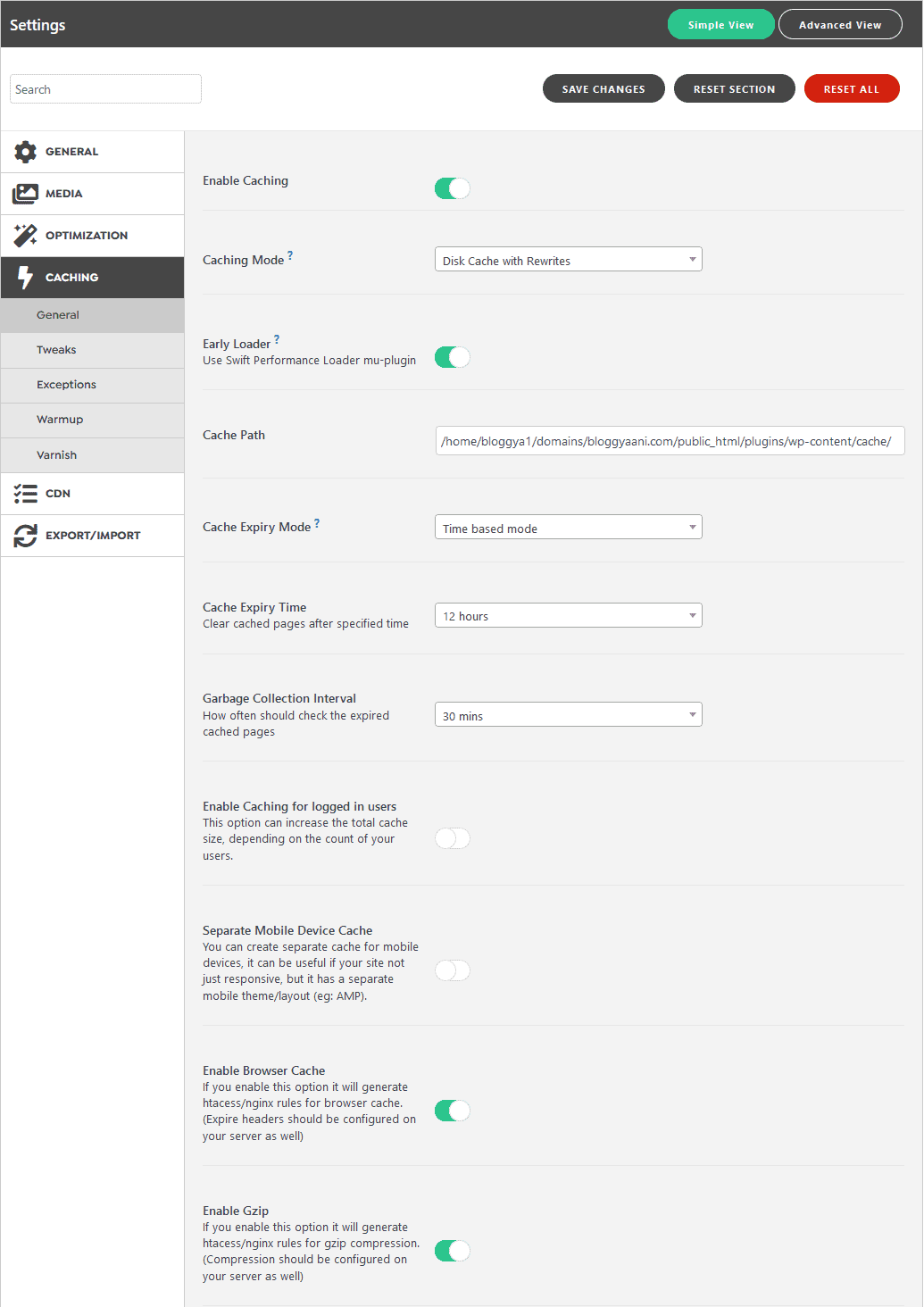
I have turned off all settings except for the ones shown in the image below.
Swift Performance Lite Performance Test:

Divi WordPress installation with Swift Performance Lite. With 27 requests, 860KB (compressed), 1.39MB(uncompressed), and 10 unoptimized images.
| GT Grade | A |
| Performance | 93% |
| Structure | 94% |
| LCP | 1.3s |
| TBT | 0ms |
| CLS | 0.14 |
| Page Size | 860 KB |
WP Rocket

WP Rocket is the best premium WordPress caching plugin, creating a positive buzz around the WordPress community. Some big names in the WordPress world use WP Rocket.
It has a simple interface for setting; I just activated the plugin for this test, and no configuration changes were done.
What I like about this plugin, after activating this plugin on my blog, I delete the Database optimizer plugin, minification plugin, and version remover code.
This means for one plugin price; I get four plugins.
I have used this plugin for almost 60 months, and it never disappoints me.
Features:
- Caches each of your pages and post.
- Uses dedicated crawlers to preload your cache by simulating visits.
- Lazyload images, Iframes, and videos to improve your page load times.
- Automatically minifies and concat your HTML, JavaScript, and Cascading Style Sheets (CSS) files.
- Optimized for use with Google Fonts.
- Fully compatible with Cloudflare for even faster loading times.
- Supports WordPress Multisite.
WP Rocket Setup:
As seen in the image below, I am not using any particular settings for this test. Still, you can experiment with your plugin settings. WP Rocket Knowledge Base offers many tutorials and settings to help speed up your WordPress blog.

WP Rocket Performance Test:
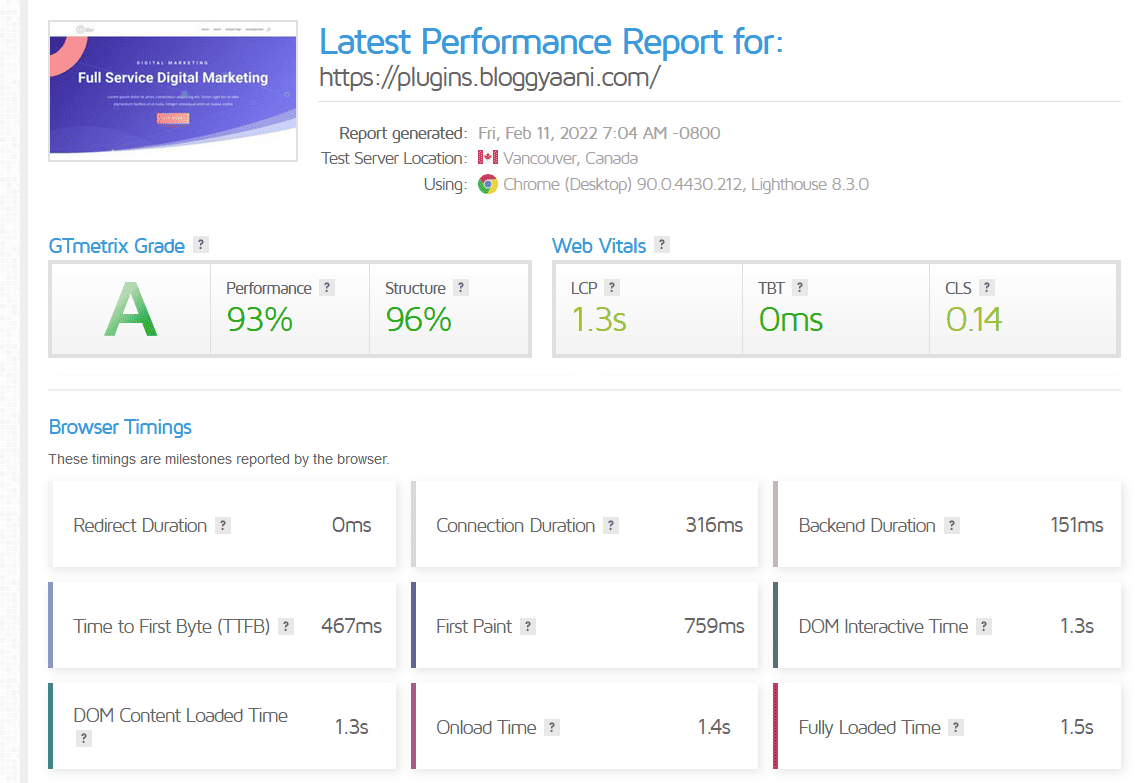
Divi WordPress installation with WP Rocket. With 26 requests, 836 KB (compressed), 1.35 MB(uncompressed), and 10 unoptimized images.
| GT Grade | A |
| Performance | 93% |
| Structure | 96% |
| LCP | 1.3s |
| TBT | 0ms |
| CLS | 0.14 |
| Page Size | 830 KB |
Summary
| Plugin Name | Default WP | Cache Enabler | WP Super Cache | WP Fastest Cache | Lite Speed Cache | Swift Performance Lite | WP Rocket |
| Performance | 92% | 93% | 95% | 93% | 91% | 93% | 93% |
| Structure | 93% | 95% | 93% | 97% | 95% | 94% | 96% |
| LCP | 1.4s | 1.3s | 1.0s | 1.3s | 1.5s | 1.3s | 1.3s |
| Backend Duration | 210ms | 153ms | 157ms | 152ms | 160ms | 154ms | 151ms |
| TTFB | 555ms | 463ms | 488ms | 465ms | 478ms | 464ms | 467ms |
| First Paint | 844ms | 746ms | 782ms | 879ms | 927ms | 738ms | 759ms |
| Onload Time | 1.4s | 1.4s | 1.4s | 1.4s | 1.6s | 1.4s | 1.4s |
| Fully Loaded Time | 1.6s | 1.5s | 1.6s | 1.5s | 1.8s | 1.5s | 1.5s |
| Requests | 26 | 27 | 27 | 25 | 26 | 27 | 26 |
| Page Size(Compressed) | 834 KB | 861 KB | 834 KB | 860 KB | 840 KB | 860 KB | 836 KB |
| Page Size(Uncompressed) | 1.34 MB | 1.38 MB | 1.34 MB | 1.32 MB | 1.36 MB | 1.39 MB | 1.35MB |
Based on the results above, it’s safe to say that Cache Enabler and Swift Performance Lite are the most user-friendly and efficient cache plugins available in the WordPress ecosystem, and the best part is they are both free.
LiteSpeed Cache performs worst, even though this test is conducted on LiteSpeed Enterprise Shared Host.
Please note that all tests were conducted with almost default settings, meaning only caching was enabled for these tests, which were repeated four to five times. Still, if you start tuning plugin settings, you can achieve better scores and speed with LiteSpeed Cache and WP Rocket.
If you are new to WordPress and do not want to spend money on a premium solution, go for LiteSpeed Cache, Cache Enabler, or Swift Performance Lite. These plugins are reliable, easy to use, and configure.
If you don’t want to use above mention plugins, choose WP Fastest Cache(free version) or WP Super Cache.
Reviewing the comparison table shows that all results are similar, with only a 100ms margin separating them from one another.
Why?
Because MyW provides excellent Direct Admin shared hosting with great uptime and speed. It’s worth mentioning that this server is hosted in Falkenstein, Germany, EU.
Please leave a comment mentioning the plugin you are currently using to improve the speed of your WordPress website or blog, and let me know your thoughts on my findings for the best user-friendly WordPress caching plugins.

Mike
WP-Rocket is the best one!
Compression, lazy loading and cache…the support is 1+!
I use this for all my clients and all pages loaded under 1sec.
masoodalam51
I also use it for clients, but server caching helps me achieve better results compared to WP Rocket.
Ernest
I have stack cache preinstalled in my managed WP. Can I install another caching plugin again?
masoodalam51
I never advise installing any WordPress plugin to speed things up if your host handles it at the server level. At BLOGGYAANI, we use the Nginx web server or LiteSpeed Enterprise Server. However, if you are still facing performance and speed issues, then contact your hosting provider.
Baldwin Jackson
Hello mate! For me, tweaking page load speed is always a serious matter. I have dedicated much time to evaluating plugins that claim to optimize WordPress page load speed.
I know that W3 Total Cache has a very good reputation in the industry. Recently I came across two-page load optimization resources, Hummingbird and Breeze Cache Plugin that I would personally recommend WordPress Community to give a try.