I am always searching for new methods to speed up my WordPress website and blogs, and I think you should too.
I prefer free plugins over paid plugins.
Now you think, Hey Masood, how does free WordPress speed up plugins for WordPress help to make WordPress faster?
And why do I want to make my WordPress faster?
First, according to Search Engine Land in 2010, Google considers site speed as a ranking factor to determine your position in SERP.
Secondly, who would want to lose visitors due to a slow website?
One advantage of using WordPress over other website creation scripts or tools is the availability of many plugins and hacks to speed up your site.
☑️: You can also study other ways to make your WP load faster by checking out our guide on speeding up WordPress websites.
Here at BLOGGYAANI, my goal is to guide new bloggers. As a new blogger on WordPress, I understand the overwhelming feeling of having big plans but not knowing where to start or how to execute them. Let me help you!
One thing experienced bloggers often advise their beginner friends to invest in premium WordPress plugins or themes. Although free options are available, the term “free” may excite people, but it could cost them their time.
This post is dedicated to new bloggers who can’t afford premium WordPress plugins when starting their blogs. You can use these free plugins to achieve the same or similar results as premium ones.
However, I recommend investing in solid premium themes and plugins as they provide a website with a strong foundation.
What are the best free WordPress plugins for speeding up a site?
Check the list below for some of the best free WP plugins for speed optimization that provides the best way to speed up your WP blog.
Free WordPress Caching Plugins
WordPress caching plugins are powerful tools that can help speed up your WP site and make it more accessible for visitors.
A WP caching plugin saves your website as a static, compressed version with no user inputs. When a visitor requests an image or article from your website’s server, WordPress can retrieve it from the cache instead of generating a new copy every time, thus reducing load times and improving performance.
Cache Enabler

Cache Enabler is a plugin that can be installed on WP sites to improve page load speed by using various caching strategies. It doesn’t need many configurations, making it quick and easy to use/install for anyone who wishes to never mess with default settings.
Cache Enabler creates static HTML files for pages and stores them on the server’s disk, allowing persistent HTML files to be delivered instead of generating pages on the fly. Helps to avoid resource-intensive backend processes in WordPress core, plugins, and databases.
Features:
- A fast and efficient cache engine
- Automatic smart cache clearing
- Manual cache clearing
- WP-CLI cache clearing
- Cache expiry
- WebP support
- Mobile support
- Brotli and Gzip pre-compression support
- Minification of HTML excluding or including inline CSS and JavaScript
- Real-time cache size display in the WordPress dashboard
- Custom post-type support
- 304 Not Modified support
- Works perfectly with Autoptimize and the majority of other third-party plugins
LiteSpeed Cache

LiteSpeed Cache for WordPress (LSCWP) offers an all-in-one site acceleration module featuring a built-in server-level cache and various optimization features.
LSCWP supports WordPress Multisite and can work with the most famous plugins, such as WooCommerce, bbPress, and Yoast SEO.
LiteSpeed Cache for WordPress has also supported ClassicPress sites.
Requirements:
- General Features can be used with any web server (LiteSpeed, Apache, NGINX, etc.).
- LiteSpeed Exclusive Features require any of the below:
- OpenLiteSpeed
- Commercial LiteSpeed products
- LiteSpeed-powered hosting
- QUIC.cloud CDN.
Features:
General Features:
- Free QUIC.cloud CDN Cache
- Object Cache (Memcached/LSMCD/Redis) Support+
- Image Optimization (Lossless/Lossy)
- Minify CSS, JavaScript, and HTML
- Minify inline & external CSS/JS
- Combine CSS/JS
- Automatically generate Critical CSS
- Lazy-load images/iframes
- Responsive Image Placeholders
- Multiple CDN Support+
- Load CSS Asynchronously
- Defer/delay JS loading
- Browser Cache Support+
- Database Cleaner and Optimizer
- PageSpeed score (including Core Web Vitals) optimization
- Opcode Cache Support+
- HTTP/2 Push for CSS/JS (on web servers that support it)
- DNS Prefetch
- Cloudflare API
- Single Site and Multisite (Network) support
- Import/Export settings
- Attractive, easy-to-understand interface
- WebP image format support
- Heartbeat Control
+ This service is not provided by the LSCache plugin nor guaranteed to be installed by your service provider. However, the service is compatible if you use the plugin on your website.
LiteSpeed Exclusive Features:
- Automatic page caching to improve site performance greatly
- Automatic purge of related pages based on certain events
- Private cache for logged-in users
- Caching of WordPress REST API calls
- Separate caching of desktop and mobile views
- Ability to schedule purge for specified URLs
- WooCommerce and bbPress support
- WordPress CLI commands
- API system for easy cache integration
- Exclude from the cache by URI, Category, Tag, Cookie, User-Agent
- Smart preload crawler with support for SEO-friendly sitemap
- Multiple crawlers for cache varies
- HTTP/2 support
- HTTP/3 & QUIC support
- ESI (Edge Side Includes) support*
- Widgets and Shortcodes as ESI blocks* (requires Classic Widgets plugin for WP 5.8+)
* Feature not available in OpenLiteSpeed
Swift Performance Lite

Swift Performance will allow any WordPress website to load much faster and provide an intelligent, modern caching system. You can also cache AJAX requests and dynamic pages and add exceptions (URL, page, or content-based rules).
Features:
- Caching
- CSS and Javascript Optimization
- Database Optimization
- Plugin Organizer
PageSpeed Ninja

PageSpeed Ninja is an ultimate WordPress performance plugin that can load your website faster on desktop and mobile devices. With just one click, you can fix any Google PageSpeed Insights issues your site may have.
Features:
- Easily enable Gzip file compression
- Fix render-blocking CSS and JavaScript
- Improve Critical Rendering Path and auto-generate above-the-fold critical CSS.
- Minify HTML, JavaScript, and CSS files
- Combine and inline Javascript and CSS
- Defer loading of Javascript and CSS
- Optimize style/script order
- Compress all images to optimize the size
- Defer images by lazy loading with optional low-quality image placeholders
- Leverage browser caching and server-side caching
- Optimize your images accurately for nearly 10,000 mobile browsers thanks to the included AMDD database – one of the most comprehensive mobile device databases available.
- And MUCH more, based on 10+ years of experience in mobile-optimizing over 200 000 websites.
WP Super Cache

WP Super Cache is the most downloaded plugin in the plugin directory. It’s active on 2 Million+ websites right now. This plugin is a product of Automatic, a parent company for WordPress.
It’s a beginner-friendly plugin with fewer options. Less choice means they provide most customization out of the box, and if you want some advanced function, then play with the configuration.
Features:
- Support for multiple caching types (Mod_Rewrite, PHP, and Legacy)
- Serve static HTML files
- Cache preload
- CDN support
W3 Total Cache
W3TC is the most advanced WordPress caching plugin activated on 1 Million+ websites. It’s not beginner-friendly, but you can find many articles on configuring W3 Total Cache for newbie guides.
Features:
- Compatible with shared hosting, virtual private/dedicated servers, and dedicated servers/clusters
- Transparent content delivery network (CDN) management with Media Library, theme files, and WordPress itself
- Mobile support: respective caching of pages by referrer or groups of user agents, including theme switching for groups of referrers or user agents
- Accelerated Mobile Pages (AMP) support
- Secure Socket Layer (SSL/TLS) support
- Caching of (minified and compressed) pages and posts in memory or on disk or on (FSD) CDN (by user agent group)
- Caching of (minified and compressed) CSS and JavaScript in memory, on disk, or on CDN
- Caching of feeds (site, categories, tags, comments, search results) in memory or on disk or on CDN
- Caching of search results pages (i.e. URIs with query string variables) in memory or on disk
- Caching of database objects in memory or on disk
- Caching of objects in memory or on disk
- Caching of fragments in memory or on disk
- Caching methods include local Disk, Redis, Memcached, APC, APCu, eAccelerator, XCache, and WinCache.
- Minify CSS, Minify JavaScript, and Minify HTML with granular control
- Minification of posts and pages and RSS feeds
- Minification of inline, embedded, or 3rd party JavaScript with automated updates to assets
- Minification of inline, embedded, or 3rd party CSS with automated updates to assets
- Defer non-critical CSS and Javascript for rendering pages faster than ever before
- Defer offscreen images using Lazy Load to improve the user experience
- Browser caching using cache-control, future expire headers, and entity tags (ETag) with “cache-busting.”
- JavaScript grouping by template (home page, post page, etc.) with embedded location control
- Non-blocking JavaScript embedding
- Import post attachments directly into the Media Library (and CDN)
- Leverage our multiple CDN integrations to optimize images
- WP-CLI support for cache purging, query string updating, and more
- Various security features to help ensure website safety
- Caching statistics for performance insights of any enabled feature
- Extension framework for customization or extensibility for Cloudflare, WPML, and much more
- Reverse proxy integration via Nginx or Varnish
- Image Service API extension provides WebP image format conversion from common image formats (on upload and on demand)
⚠️: If you find any error after activating Minifying option, disable it and use Autoptimize for better minification.
Free WordPress CDN Plugins
CDN plugins for WordPress help enhance page loading speed by caching content on servers located strategically close to the user.
WordPress CDN plugins store images, JavaScript files, CSS files, and other assets on servers that are distributed geographically to ensure faster delivery of web pages and increase the chances of content being delivered quickly.
Super Page Cache for Cloudflare

The Super Page Cache for Cloudflare plugin offers advanced caching features that can help make your website incredibly fast. In addition to caching static files such as CSS, JS, and images, this plugin also caches HTML web pages generated by WordPress, both at the server disk level and on the global Cloudflare CDN.
Unlike many other caching plugins that only offer disk-cache hosting (meaning they serve cached web pages from your web server), this plugin caches your website content to the Cloudflare CDN, known to be one of the fastest networks in existence.
Features:
- Developed to work flawlessly with any Cloudflare Plan (be it Cloudflare Free or Pro or Business or Enterprise account)
- Takes full advantage of Cloudflare Cache Everything Page Rule
- Cache Buster Support to ensure logged-in users don’t see cached content
- Page Caching by using Cloudflare Worker (alternate to page rule solution, needs to be manually activated in plugin settings)
- No Cache Buster when using Cloudflare Worker-based Page Caching solution
- Ability to overwrite our default Worker code to add your custom login into it
- Disk level fallback cache system for the requests which might not yet be cached by Cloudflare or have expired in Cloudflare cache (plugin settings – Cache tab)
- Ability to select and customize what you want to cache and what you don’t (plugin settings – Cache tab)
- Fallback cache in which you can keep your custom response to header data (most plugins remove them)
- Automatically purge the post/page/CPTs when you update them, along with the related pages where they might be a sentence
- Ability to purge only HTML pages of your website rather than purging everything (HTML pages + static contents)
- Ability to preload pages based on page URLs, sitemaps, and last 20 published/updated contents
- Run the preloader manually (from plugin settings) or over a CRON job
- Ability to automatically purge Varnish cache (if your server has Varnish enabled) when Cloudflare cache is purged
- Automatically purge OPcache & object cache when Cloudflare cache is purged
- Purge the whole Cloudflare cache using the CRON job
- Give Cloudflare cache purge permission based on user roles
- Auto pre-fetch URLs present in Viewport
- Auto pre-fetch URLs on mouse hover (by using instant. page script),
- Ability to keep the plugin settings on deactivation (needs to be enabled in plugin settings – Others tab)
- Export/Import plugin settings as JSON
- Ability to purge Cloudflare cache from the WP Admin toolbar
- Ability to exclude a page from being cached on individual page/post bases (Turn off the Disable meta boxes on single pages and posts option in plugin settings – Others tab)
- Integration to many popular hosts (e.g. Kinsta, WP Engine, SpinupWP) internal server caching
- Integration to popular eCommerce systems like WooCommerce and Easy Digital Downloads (EDD) [plugin settings – Third Party tab]
- Integration to countless third-party plugins (e.g., Cache Enabler, Autoptimize, W3 Total Cache, LiteSpeed Cache, Hummingbird, WP-Optimize, WP Rocket, WP Asset Clean Up, WP Performance, Yet Another Star Rating, Swift Performance, Siteground SuperCacher, etc.)
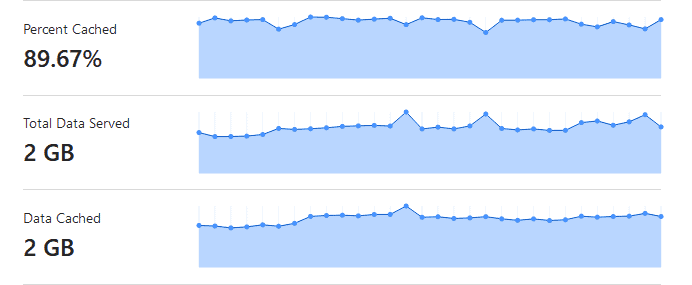
As you can see in the below picture, using Super Page Cache for Cloudflare on BLOGGYAANI with a free Cloudflare account, I can reduce server bandwidth usage by nearly 90% and provide visitors with an exceptionally fast website experience.
CDN Enabler

CDN Enabler is a simple and easy-to-use WordPress plugin that rewrites URLs for CSS, JavaScript, and images. It acts by making sure these files are served through content providers. This helps improve site performance, reliability, and scalability by offloading most traffic to a CDN.
Features:
- The fast and efficient rewrite engine
- Manual and WP-CLI cache purging
- Include URLs in the rewrite by file extensions
- Exclude URLs in the rewrite by strings
- WordPress multisite network support
- WordPress REST API support
- Works perfectly with Cache Enabler and the majority of third-party plugins
Free Minification and Compressing Plugins
Minifying reduces the size of a web page or web application by removing all unnecessary codes. In WordPress, minifying is done with the help of plugins. Minification plugins compress the code already being used, reduce the page size, and save time and bandwidth.
WordPress also uses GZIP compression, a web standard with a lossless data compression technique.
Autoptimize

Autoptimize optimizes your website easily. It can combine all scripts and styles in one file. Minify and compress them, add expired headers, and cache them. It also moves style to the page head and script to the footer. It’s minified HTML code and saves extra bits of bandwidth. Autoptimize can also optimize and lazy-load images, and optimize Google Fonts. Even on HTTP/2, Autoptimize can enhance website performance.
I have used this plugin since 2017 and have never gotten any errors. My only problem is that this plugin does not clear the cache by itself.
Features:
- Minifies JavaScript, CSS, and HTML
- Adds expires headers
- Cache minified files
- Moves styles to the page head
- Move scripts to the footer
- Optimize Google webfonts
Fast Velocity Minify

Fast Velocity Minify is for both developers and advanced users. It helps you compress your site’s CSS, JS, and HTML so that the speed of your website loads faster than before. As a normal WordPress user, don’t worry. You can also use this minification plugin and visit the setting page after activating it.
Note you need to look into the HELP tab after installing modules to configure it correctly on your website. Different sites need different default recommendations, so you must test and find out how to adjust your settings.
Minification happens until the first uncached request. By implementing the first request that needs combined CSS and JS files, any other pages which need this particular type of file will be able to use what was already generated.
Free Image Optimization Plugins
One of the most important aspects of the website is the images. Images offer a stunning view and can be enhanced or edited to represent an idea or concept.
WP image optimization plugins help reduce the size of the images uploaded to the website, compress them to reduce their file size, and allow visitors to load websites faster and consume less bandwidth.
ShortPixel Image Optimizer

Images are the heaviest part of any web page. ShortPixel image optimizer optimizes images and reduces their size without degrading the quality of the image, converting them into webp or Avif formats. It also reduces your PDF size.
Install it and choose your preferred option, like lossy/lossless. It automatically optimizes your newly uploaded image. ShortPixel provides 100 image/month optimization in the free plan. Use the below to get extra 100 image optimization credits.
Features:
- Simple to Use
- Automatically resize/optimize your images
- Bulk Image optimization option available
Imagify Image Optimizer
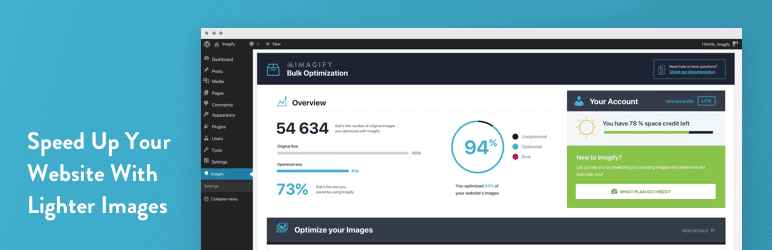
Imagify provides a similar service to ShortPixel but provides extra options to get lighter images than ShortPixel. This setting clearly shows image quality degradation.
It’s better for the compression of JPG images, and they provide a better plan in the free membership program. Imagify provides a 20MB / Month quota (free plan) for optimizing the image. This plugin saves 3.5 MB from my other blog’s 7 MB image folder.
Features:
- Resize/optimize your image automatically
- Bulk image optimizing option
- Simple to use
✅: WP Media, a creator of WP Rocket, the best WordPress premium caching plugin for speeding up websites, is also developing Imagify.
Free Images and Iframes Lazyload Plugins
Images and Iframes lazyload plugins work by deferring the loading of images and iframes until the user needs them. When a user lands on a web page, the plugin will only load the images and iframes visible in the viewport, and as the user scrolls down, the plugin will instruct the browser to load additional content that becomes visible.
Rocket LazyLoad

Rocket lazyload displays images on a page only when visible to the user, reducing the number of HTTP request mechanisms and improving loading time.
Rocket lazyLoad works on thumbnails, all images in post content or widget text, avatars, and smiles. No JavaScript library, such as jQuery, is used, and the script weighs less than 10kb.
Features:
- Simple to use
- Small Size
- Not Depends on jQuery
☑️: Rocket Lazyload is a product of WP Media, the same company behind the development of Imagify and WP Rocket plugins.
a3 Lazy Load

A3 Lazy Load is a mobile-oriented, simple-to-use plugin that considerably quickens website loading times. The more content-heavy your website is, the better this plugin will work and the more you will see any performance improvements.
A3 Lazy Load is inspired and powered by the ressio Lazy-Load-xt JavaScript.
Features:
- 100% compatible with WP 5.9
- Image lazy load / Webp images
- Iframe lazy load
- Posts embed
- WordPress AMP
- Jetpack site accelerator (Photon)
- Javascript disabled fallback
BJ Lazy Load

This plugin will ensure your viewers stay interested in your content. It replaces all of your images, post thumbnails, gravatar images, and iframes with a placeholder that loads the content as it gets close to entering into view of your visitor’s browser window when they scroll the page. Also works with text widgets.
Since it works with iframes, it also covers embedded videos from YouTube, Vimeo, etc.
Features:
- Replaces post images, Gravatar images, and post thumbnails
- Replaces content iframes with a placeholder until content needs to load
- The plugin uses jQuery to operate
- Serves scaled-down images with responsive designs
Summary
If you want to speed up your WordPress website or blog, install a few plugins from the above list and measure your site speed.
Here are some free tools for measuring your website speed,
Please don’t install everything on your blog because less is more. There are many ways to speed up your WordPress site, and a plugin is a safe and best way.
Here is a quick question: Which free plugin makes your WordPress faster?
Please share your experience with us in the comments section below, and don’t forget to share it with your followers.

Mark Henry
Hi Masood! I liked your Wonderful list of WordPress plugins. All are very useful.
I also want to suggest to you the ‘Trash Duplicate and 301 Redirect’ WordPress plugin. It will not only make your website faster but also help you to find and delete duplicate content. Also permanently redirect removed content URL to the main URL to divert traffic to one URL and be safe from being penalized by Google for duplicate content.
Ratan Mia
I also recommend the plugin – Plugin Organizer. It lets you choose which plugins to load by page or post. This helps a ton with page speed when you don’t need most plugins for most pages.
masoodalam51
It’s a great plugin, but sometimes it doesn’t work for me. Instead of using Plugin Optimizer, I am using a plugin load filter.